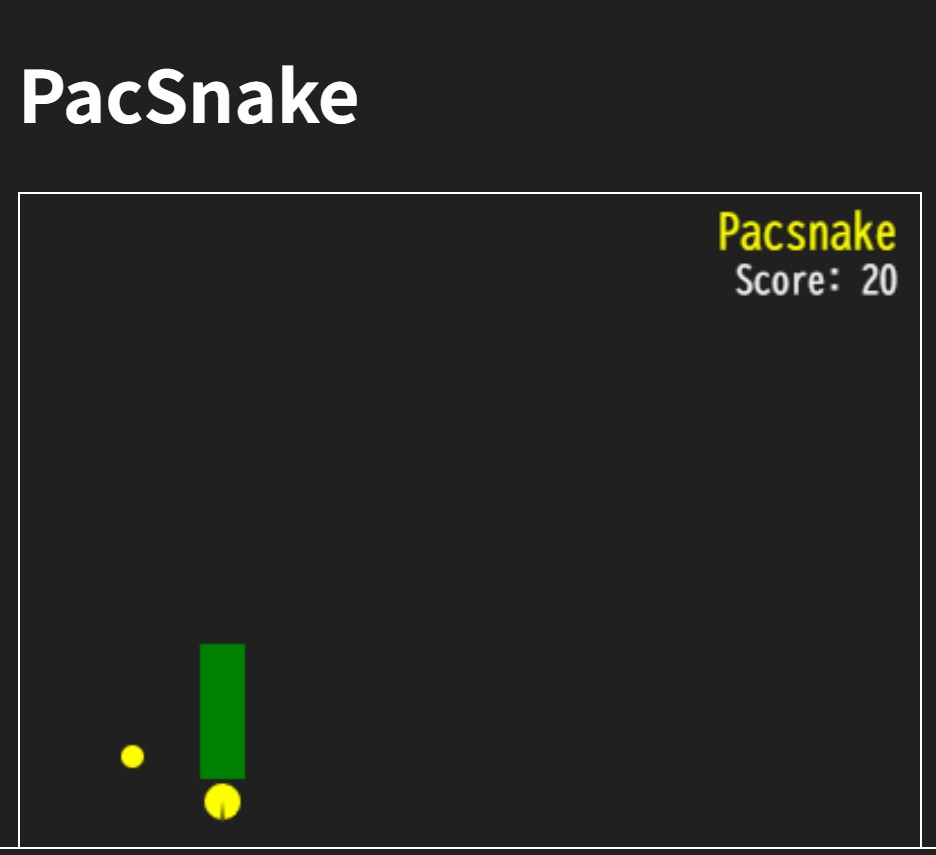
JavaScriptとHTML5 Canvasを使って、Pac-Man風のミニゲーム「PacSnake」を作成します。
ブラウザだけで動作し、インストール不要で遊べるのが特徴です。
■ステップ1:HTMLファイルを作成する
まずはゲームを表示するHTMLを作成します。
Canvas要素を1つ用意し、JavaScriptファイルを読み込みます。
<h1>PacSnake</h1>

<canvas id="game" width="400" height="400" style="border:1px solid black"></canvas>

<script src="pacsnake.js"></script>
■ステップ2:Canvasと基本設定
JavaScript側でCanvasを取得し、描画用の設定を行います。
const canvas = document.getElementById("game");
const ctx = canvas.getContext("2d");

const SIZE = 20;
const COLS = 20;
const ROWS = 20;
■ステップ3:ゲーム状態を定義する
スネーク(PacSnake)の初期位置や、スコアなどの状態を定義します。
let snake = [
  { x: 10, y: 10 },
  { x: 9, y: 10 }
];

let dir = "right";
let food = { x: 5, y: 5 };
let score = 0;
let mouthPhase = 0;
let gameOver = false;
■ステップ4:描画処理を作成する
ブロック、エサ、Pac-Man本体を描画する関数を用意します。
function drawBlock(x, y, color) {
  ctx.fillStyle = color;
  ctx.fillRect(x * SIZE, y * SIZE, SIZE, SIZE);
}

function drawFood(x, y) {
  ctx.fillStyle = "yellow";
  ctx.beginPath();
  ctx.arc(
    x * SIZE + SIZE / 2,
    y * SIZE + SIZE / 2,
    SIZE / 4,
    0,
    Math.PI * 2
  );
  ctx.fill();
}
■ステップ5:Pac-Manの口パクアニメーション
sin関数を使って、口がパクパク動くPac-Manを描画します。
function drawPacman(x, y, dir) {
  const cx = x * SIZE + SIZE / 2;
  const cy = y * SIZE + SIZE / 2;
  const r = SIZE / 2 - 2;

  const mouth = Math.abs(Math.sin(mouthPhase)) * (Math.PI / 4);
  let start = 0, end = 0;

  if (dir === "right") { start = mouth; end = Math.PI * 2 - mouth; }
  if (dir === "left")  { start = Math.PI + mouth; end = Math.PI - mouth; }
  if (dir === "up")    { start = Math.PI * 1.5 + mouth; end = Math.PI * 1.5 - mouth; }
  if (dir === "down")  { start = Math.PI / 2 + mouth; end = Math.PI / 2 - mouth; }

  ctx.fillStyle = "yellow";
  ctx.beginPath();
  ctx.moveTo(cx, cy);
  ctx.arc(cx, cy, r, start, end);
  ctx.closePath();
  ctx.fill();
}
■ステップ6:ゲームロジックを実装する
移動、衝突判定、エサ取得処理をまとめます。
function update() {
  if (gameOver) return;

  const head = snake[0];
  let newHead = { ...head };

  if (dir === "right") newHead.x++;
  if (dir === "left") newHead.x--;
  if (dir === "up") newHead.y--;
  if (dir === "down") newHead.y++;

  if (
    newHead.x < 0 || newHead.x >= COLS ||
    newHead.y < 0 || newHead.y >= ROWS
  ) {
    gameOver = true;
    return;
  }

  if (snake.some((p, i) => i && p.x === newHead.x && p.y === newHead.y)) {
    gameOver = true;
    return;
  }

  mouthPhase += 0.3;

  if (newHead.x === food.x && newHead.y === food.y) {
    score += 10;
    food = {
      x: Math.floor(Math.random() * COLS),
      y: Math.floor(Math.random() * ROWS)
    };
  } else {
    snake.pop();
  }

  snake.unshift(newHead);
}
■ステップ7:画面描画とUI表示
右上にタイトルとスコアを表示し、ゲームオーバー画面も描画します。
function draw() {
  ctx.clearRect(0, 0, canvas.width, canvas.height);

  drawFood(food.x, food.y);

  snake.forEach((p, i) =>
    i === 0 ? drawPacman(p.x, p.y, dir) : drawBlock(p.x, p.y, "green")
  );

  ctx.textAlign = "right";
  ctx.fillStyle = "yellow";
  ctx.font = "20px monospace";
  ctx.fillText("Pacsnake", canvas.width - 10, 24);

  ctx.fillStyle = "white";
  ctx.font = "16px monospace";
  ctx.fillText("Score: " + score, canvas.width - 10, 44);
  ctx.textAlign = "left";

  if (gameOver) {
    ctx.fillStyle = "rgba(0,0,0,0.7)";
    ctx.fillRect(0, 0, canvas.width, canvas.height);
    ctx.fillStyle = "red";
    ctx.font = "32px monospace";
    ctx.textAlign = "center";
    ctx.fillText("GAME OVER", canvas.width / 2, canvas.height / 2);
    ctx.font = "16px monospace";
    ctx.fillText("Press R to Restart", canvas.width / 2, canvas.height / 2 + 30);
  }
}
■ステップ8:キー操作とゲームループ
矢印キーで操作し、Rキーでリスタート可能にします。
setInterval(() => {
  update();
  draw();
}, 300);

document.addEventListener("keydown", e => {
  if (gameOver) {
    if (e.key === "r") location.reload();
    return;
  }

  if (e.key === "ArrowUp" && dir !== "down") dir = "up";
  if (e.key === "ArrowDown" && dir !== "up") dir = "down";
  if (e.key === "ArrowLeft" && dir !== "right") dir = "left";
  if (e.key === "ArrowRight" && dir !== "left") dir = "right";
});
■完成
これでPac-Man風の「PacSnakeゲーム」が完成です。
Canvasを使うことで、シンプルながらゲーム開発の基礎を学ぶことができます。
ぜひ改造して、自分だけのゲームに発展させてみてください!


コメント